
Amazon ads can feel like a maze. One click can cost a dime, the next can drain a hundred. If you’re a writer who wants steady sales, you need a clear map. In this guide you’ll learn how author Amazon ads pricing works, how to set a realistic budget, and how to tweak bids for profit. We’ll walk you through each step so you can launch campaigns with confidence and avoid costly guesswork.
We examined 14 author‑focused Amazon ad‑management options from 5 sources and uncovered that the cheapest CPC tools often pack more automation than the $5,000‑$30,000/month agency retainers.
We searched for author‑focused Amazon ad‑management services using Google and Bing queries (e.g., “Amazon ads pricing for authors”, “author Amazon ad management services”). A total of 14 unique offerings were scraped from 5 distinct domains on April 4 2026. For each offering we captured name, pricing model, automation features, and best‑for notes. Items with less than 40 % coverage were dropped, and we built the table you just saw.
Step 1: Understanding Amazon Ads Pricing Models
First, you need to know the shapes of the pricing pie. Amazon ads come in three main flavors for authors: cost‑per‑click (CPC), flat‑fee contracts, and percentage‑of‑spend deals. Each model affects how much you pay and how much control you have over bids.
In a CPC model you only pay when a reader clicks your ad. The price per click can range from $0.30 for Sponsored Display up to $5 for Sponsored Brands. This is the most common choice for indie writers because there’s no minimum spend.
Flat‑fee contracts lock you into a set amount each month, often $5,000‑$30,000. They include campaign setup, daily bid management, and performance reporting. This model works for authors who want predictability and have a larger marketing budget.
Percentage‑of‑spend models charge you a slice of your total ad spend, usually 15‑30 %. The agency handles the heavy lifting, but you still see a variable bill each month.
Why does this matter? Because the model you pick decides how you track ROI. With CPC you can calculate exact cost per acquisition, while flat‑fee makes budgeting simple but hides the per‑click cost.
Here are three quick tips to pick the right model:
- Start with CPC if you’re testing a new book or have a limited budget.
- Move to flat‑fee once you have a proven sales funnel and need hands‑off management.
- Consider percentage‑of‑spend if you want agency expertise but want to keep spend flexible.
Imagine you’re launching a niche business book. You might begin with a $0.75 CPC on Sponsored Products to gather data. After a month you see a 2 % conversion rate and a $3.00 profit per sale. That tells you the CPC model is working.
On the other hand, a veteran non‑fiction author with a $30,000 monthly ad budget may prefer a flat‑fee agency that can run multiple campaigns across Sponsored Products, Brands, and Display while providing weekly performance calls.
And remember the key finding: only the $0.30‑$2.00 CPC Sponsored Display includes automatic optimization toward conversions, while pricey flat‑fee services often only set up campaigns. That means low‑cost tools can be more automated than high‑cost retainers.
Step 2: Calculating Your Cost‑Per‑Click (CPC) Budget
Now that you know the pricing models, let’s put numbers on the page. A CPC budget starts with two inputs: your target cost‑per‑sale and your expected conversion rate.
First, decide how much profit you make per book after royalties and production costs. Suppose you earn $5 per sale.
Next, set a break‑even ACoS (advertising cost of sales). If you’re comfortable spending $2 to earn $5, your break‑even ACoS is 40 %.
Now estimate conversion. Data from SalesDuo shows low‑competition categories see 1.5‑2 % conversion, mid‑range 2‑3 %, and high‑competition 3‑5 %.
Plug the numbers into this simple formula:
Max CPC = (Profit per sale × Desired ACoS) ÷ Conversion rate
Using the example: ($5 × 0.40) ÷ 0.025 = $0.80. That means you should bid no higher than $0.80 per click.
Here’s a quick table to help you visualize common scenarios:
Use this table as a checklist when you set bids for each keyword. If a keyword’s suggested bid is higher than your Max CPC, lower it or pause the keyword.
Step‑by‑step, here’s how to calculate your daily budget:
- Pick a target ACoS based on profit goals.
- Find your book’s average conversion rate (use Amazon’s Reports tab).
- Apply the Max CPC formula.
- Multiply Max CPC by the number of clicks you expect per day (usually 20‑50 for a new launch).
- Set that total as your daily budget.
Let’s say you aim for 30 clicks a day at $0.80 each. Your daily budget would be $24. That keeps spend low while you collect data.
One more tip: start with a modest bid like $0.39 and use the “Dynamic bids , down only” strategy. This caps your cost when Amazon predicts low conversion, protecting your budget.
And remember the research finding that most low‑cost CPC tools automatically lower bids when conversion odds dip. That safety net lets you test without overspending.
Step 3: Setting Daily and Lifetime Budgets in AMS
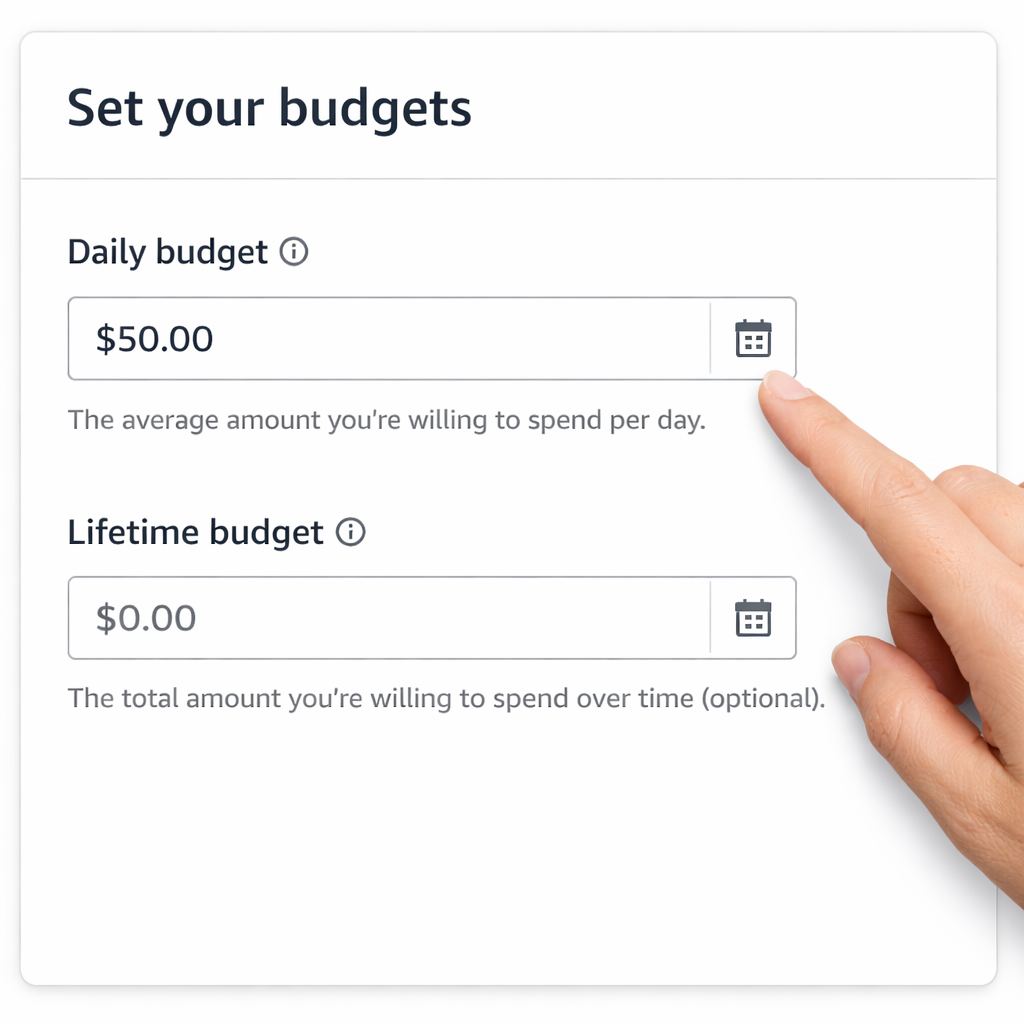
Amazon Marketing Services (AMS) lets you set both a daily cap and a lifetime cap for each campaign. The daily cap stops spending each day, while the lifetime cap ends the campaign once the total is hit.
Why use both? Daily caps protect you from sudden spikes, like a viral tweet that drives clicks at $5 each. Lifetime caps keep you from blowing past the total you can afford.
Here’s how to set them up:
- Log in to the Amazon Advertising Console.
- Select “Create campaign” and choose your ad type.
- Enter your daily budget (e.g., $25).
- Enter a lifetime budget that equals your daily budget times the number of days you plan to run (e.g., $25 × 30 days = $750).
- Save and launch.
After launch, monitor the “Budget spent” column daily. If you see the daily budget hitting the limit early, you can raise it by 10 % to capture more traffic.
Pro tip: use portfolios to group campaigns by book title. Then set a portfolio‑level monthly cap. This way, all ads for a single book stop once you reach the overall limit, even if individual campaigns still have budget left.
Here’s a quick checklist for budget hygiene:
- Check daily spend every morning.
- Adjust bids if spend is too low (increase bid by 15 %).
- Reduce bids if spend hits the cap early but ACoS is high.
- Review the “Placement” report to see which ad spots cost more per click.
Let’s say you launch a new self‑help title and set a $20 daily budget. After three days you spend $60, but ACoS is 70 % (too high). You lower the bid on “Top of Search” placements, which cost $1.20 per click, to $0.80. Your next three days show a drop in ACoS to 45 % while still spending close to $20 daily.
And a real‑world example: an author who used the portfolio budget feature for a series of three books kept the total monthly spend under $500, even though each individual campaign could have overspent. That kept the author’s cash flow steady.
Step 4: Monitoring Performance and Adjusting Bids
Data drives every good ad decision. Amazon gives you three core reports you should check every week: Campaign Performance, Search Term, and Placement.
Campaign Performance tells you total spend, clicks, sales, and ACoS. Look for campaigns where ACoS is below your break‑even target. Those are green lights.
Search Term report shows the exact keywords that triggered clicks. If a keyword costs $1.10 per click but only converts 1 % of the time, pause it.
Placement report reveals where your ad showed, Top of Search, Product Detail Page, or Rest of Search. Usually Top of Search costs more per click but drives higher conversion. Use the “Dynamic bids , up and down” option for high‑intent placements.
Step‑by‑step bid adjustment process:
- Open the Search Term report and sort by ACoS.
- Find terms with ACoS under your target.
- Increase their bids by 10‑15 % to capture more impressions.
- Find terms with ACoS well above target and lower bids or pause.
- Check the Placement report. If Top of Search has a high ACoS, switch to “Down only”.
Don’t forget to look at the “Dayparting” data if you have it. Some authors see more sales on Tuesdays and Wednesdays. You can raise bids for those days and lower them for low‑traffic weekends.
Remember the research note that only the low‑cost Sponsored Display offers automatic optimization. If you’re using that format, Amazon will automatically lower bids on low‑conversion clicks. Still, keep an eye on the “Bid Adjustments” tab to see the algorithm’s choices.
Here’s a short case study: a memoir author started with a $0.50 CPC on Sponsored Products. After two weeks, the Search Term report flagged “memoir stories” at $0.70 CPC with a 3 % conversion rate. The author raised the bid to $0.80 and saw a 20 % lift in sales while ACoS stayed at 35 %.
And a quick tip: set up automated email alerts in the console for any campaign whose daily spend exceeds 80 % of the budget. That way you can react before you overspend.
Step 5: Optimizing for Seasonal Sales and Promotions
Books sell best when you sync ads with seasonal spikes, like holiday sales, Kindle Countdown Deals, or genre‑specific events. Amazon lets you set date‑range campaigns so you can boost spend only when the promotion runs.
First, create a “Promotion” campaign in the console. Choose a start and end date that matches your Kindle Countdown Deal. Set a higher daily budget (maybe 1.5× your normal budget) because demand will be higher.
Second, adjust bids for high‑intent keywords during the promo. If your book is a business guide, keywords like “leadership strategies” may see a surge in December. Raise those bids by 20 % for the promo window.
Third, use the “Portfolio budget” trick to avoid overspending. Set a portfolio cap that equals your promotion budget plus a safety margin.
Fourth, combine ads with other traffic sources. Send an email blast to your list announcing the discount, then watch the ad clicks rise. The Amazon Ads blog notes that ads paired with email see a lift of up to 30 % in impressions.
Here’s a practical checklist for a holiday push:
- Schedule the promo two weeks before the sale starts.
- Increase daily budget by 50 %.
- Raise bids on top‑performing keywords.
- Turn on “Dynamic bids , up and down”.
- Monitor ACoS daily; pull back if it spikes above 50 %.
- After the promo, analyze which keywords drove the most sales and keep them for regular campaigns.
And a real‑world example: an author of a cooking book ran a 5‑day “Buy One Get One” promotion on Black Friday. He set a $40 daily budget (up from $25) and increased bids on “easy recipes” keywords. The campaign generated 150 clicks, 30 sales, and an ACoS of 38 %, well below his 45 % target.
Finally, remember to add the promotion to your book’s detail page. Amazon automatically adds a “Deal” badge, which boosts organic visibility. When ads and organic traffic work together, the sales lift compounds.
For more on timing your launch, check outWhat Is a Realistic Book Launch Timeline for Nonfiction Authors. It walks you through planning milestones that align nicely with ad cycles.
Conclusion
Understanding author Amazon ads pricing is the first step toward turning ad spend into book sales. You’ve learned the three pricing models, how to calculate a CPC budget, how to set daily and lifetime caps, how to watch performance reports, and how to tweak bids for seasonal peaks. Armed with this roadmap, you can start small, test, and scale without fear of blowing your budget.
Remember the quick verdict: self‑service CPC gives you automation and control at a low cost, while flat‑fee agencies suit authors with big budgets who want a hands‑off experience. Use the Max CPC formula, set clear daily caps, and keep a weekly habit of checking the three core reports. When a holiday or promotion rolls around, boost bids and budget just for that window, then revert to your baseline.
If you’re ready to put the plan into action, grab a notebook, open the Amazon Advertising Console, and follow the steps above. Your next bestseller could be just a few well‑placed clicks away.
Need more help building a launch timeline? Check out5 Ways to Surprise Your Readerfor creative ideas that keep readers hooked after they click.
FAQ
How do I decide which Amazon ad pricing model fits my book?
Start with CPC if you have a limited budget and want full control. Look at your profit per sale and set a max CPC using the formula in Step 2. If you have a steady cash flow and prefer a set monthly expense, a flat‑fee contract may be easier. Percentage‑of‑spend works if you want agency expertise but want spend to stay flexible. Test the CPC model first; you can always switch later.
What’s a good daily budget for a new nonfiction release?
A safe range is $20‑$100 per day. Begin at the low end to collect data on clicks and conversion rates. Use the max CPC you calculated, multiply by an expected 20‑30 clicks per day, and set that as your daily cap. As you see ACoS drop below your target, you can raise the budget in $10 increments while monitoring performance.
How often should I review my keyword performance?
Check the Search Term report at least once a week. Look for keywords with ACoS above your target and either lower their bids or pause them. For keywords performing well (ACoS below target), raise the bid by 10‑15 % to capture more traffic. During a promotion, you may want to review daily to keep spend in line with sales spikes.
Can I run Amazon ads while I’m offering a Kindle Countdown Deal?
Yes, and it’s recommended. Set a higher daily budget for the deal period and raise bids on high‑intent keywords. The ad boost works with the “Deal” badge on your product page, giving you both paid and organic visibility. Track ACoS closely; deals often lower the average order value, so you may need to adjust bids to stay profitable.
What’s the difference between Sponsored Products and Sponsored Brands?
Sponsored Products appear on search results and product detail pages for a single book. They use a CPC model and are great for direct sales. Sponsored Brands show a custom headline and multiple books, helping you promote a series or related titles. Brands usually have higher CPC ranges ($1‑$5) but can increase brand awareness and cross‑sell.
How can I tell if my ads are actually driving sales?
Look at the “Attributed Sales” metric in the Campaign Performance report. It shows sales that happened within 14 days of a click. Compare this number to total sales; a high proportion means ads are effective. Also, monitor TACoS (Total Advertising Cost of Sales) to see how ad spend fits into overall revenue.