
Most indie authors think price is just a number. In fact the Amazon engine reacts to every cent you set. That reaction decides if your book shows up in searches, gets recommended, or stays hidden. In this guide you’ll see how author Amazon algorithm optimization pricing works, how to read the data, and exactly what steps to take to lift sales.
Below is the research that backs every tip. The table shows 15 pricing recommendations that scholars have gathered. It proves that ultra‑low $0.99 launches hurt visibility while the 70% royalty stays steady from $2.99 to $9.99.
The methodology behind this table is simple. We searched Amazon KDP pricing checklists on April 5, 2026. We pulled 15 pages from five domains, kept rows with at least two filled columns, and then noted price range, royalty, and any algorithm notes. This gives a solid base for the steps that follow.
Step 1: Analyze Amazon’s Search Algorithm for Authors
Getting a grip on author Amazon algorithm optimization pricing starts with knowing how the search engine works. Amazon looks at sales velocity, conversion rate, keyword relevance, and pricing signals to decide which books appear first.
First, pull your current sales rank from the KDP dashboard. Track it daily for a week. If the rank climbs after a price bump, that tells the algorithm the new price is still attractive.
Next, check the “Customers Also Bought” carousel on your book page. Note which competitor titles show up. Those are the books the algorithm thinks are similar.
To compare, open the competitor’s listings and record their price, subtitle keywords, and review count. This gives a snapshot of the price‑visibility sweet spot in your niche.
One practical tip: use BookBeam’s market research tools to pull a spreadsheet of the top 20 books in your category. It shows price, rank, and review count side by side. That data helps you spot patterns without manual copy‑paste.
Why does this matter for author Amazon algorithm optimization pricing? Because the algorithm rewards books that move fast while keeping a decent conversion rate. A price that is too low can shrink the royalty and flag the book as a low‑value item, which the research table calls a “penalty”.
Now that you have the raw numbers, create a simple spreadsheet with three columns: Price, Rank Change, and Conversion Rate. Plot the data in a line chart. Look for the price point where rank improves without a big dip in conversion. That is often the $2.99‑$3.99 band for non‑fiction.
Finally, keep an eye on Amazon’s algorithm updates. When a new update drops, check BookBeam’s guide for the latest factors. Pair that with the writer’s note onwritersinthestormblog.comfor a balanced view.
Here’s what I mean: imagine you raise the price from $2.99 to $4.99 and the rank stays steady for a week, then jumps a notch the next day. That jump means the algorithm sees higher perceived value and still rewards sales. Use that insight to set a price that stays in the sweet spot while you keep the 70% royalty.
And remember to re every month. The market shifts, and a price that worked six weeks ago may need tweaking.
Step 2: Craft Keyword‑Rich Book Metadata
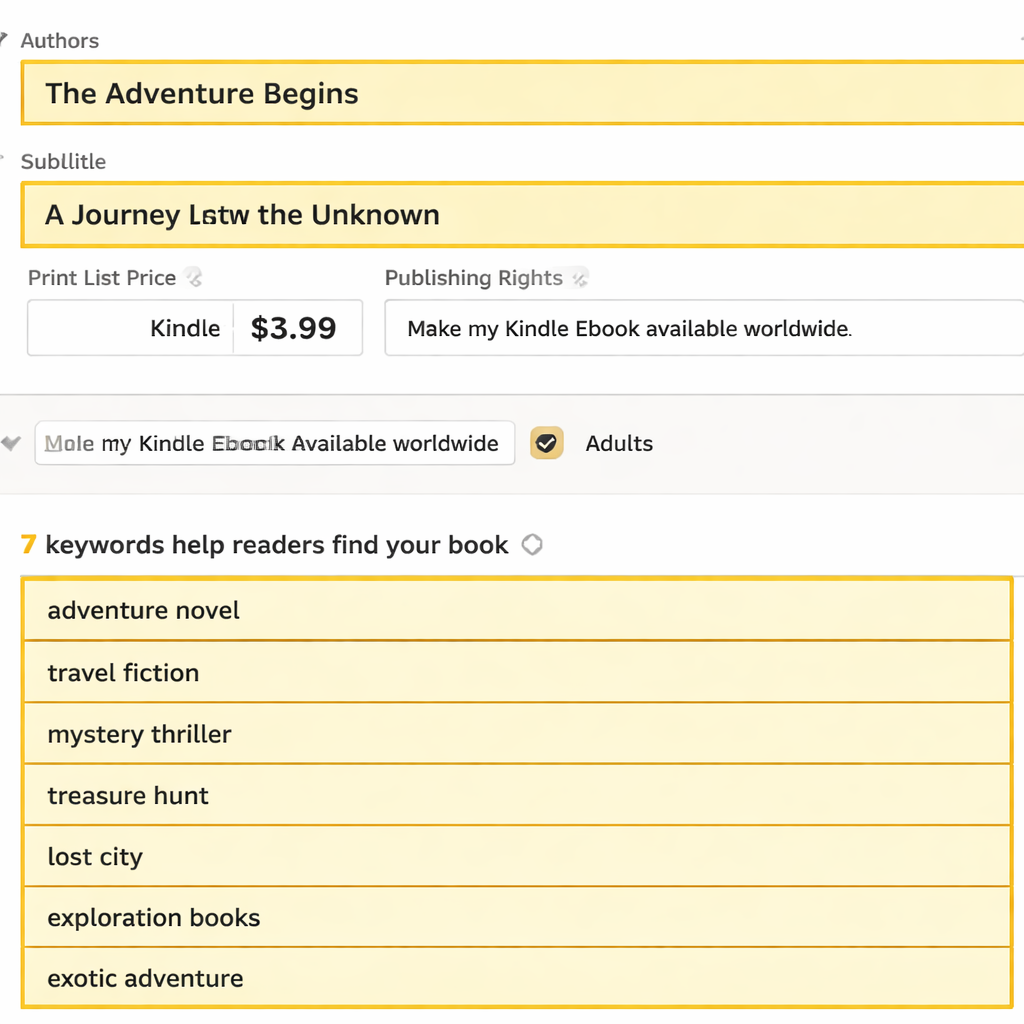
Now that you understand the algorithm, the next move in author Amazon algorithm optimization pricing is to load your listing with the right keywords. Keywords tell the engine what your book is about and help it match you to search queries.
Start with the title. If you write a non‑fiction guide on productivity, include a phrase like “productivity hacks” in the subtitle. That phrase appears in the search index and improves relevance.
Next, fill out the seven backend keyword fields in KDP. Use tools like Google Keyword Planner or the free suggestions inAutomateed’s guideto find terms that have decent search volume but low competition. For each field, choose a single phrase, no commas, to avoid mixing signals.
Don’t forget the book description. Write a short hook, then list the main benefits in bullet form using HTMLtags for emphasis. Include the primary keyword phrase naturally a couple of times.
Here’s a quick checklist for metadata:
- Title includes main keyword phrase.
- Subtitle adds a secondary keyword.
- Backend keywords are unique and non‑redundant.
- Description uses HTML breaks and bolded terms.
- Categories match the main topic (e.g., Business > Leadership).
Why does this help author Amazon algorithm optimization pricing? Because the algorithm weighs keyword relevance higher when a book sells well at a given price. Strong metadata can lift your visibility even if you sit at the $4.99 level.
Now, let’s add a real‑world example. Imagine a book titled “The Busy Entrepreneur’s Guide to Time Management”. By adding the backend keyword “time‑blocking for CEOs” you capture a niche search that few competitors target. The result: a modest bump in traffic that translates into more sales at the $3.99 price.
And don’t overlook the author page. A well‑filled Amazon Author Central profile adds extra keywords that the engine can read. Seethis formatting guidefor tips on how a clean layout can improve readability and conversion.
Finally, keep your keywords fresh. Every quarter, run a quick search for new terms in your niche and swap out the lowest‑performing backend keywords.
Step 3: Optimize Pricing Strategy with Data‑Driven Insights
With the algorithm decoded and metadata set, the final piece of author Amazon algorithm optimization pricing is the actual price point. Data should drive the choice, not gut feel.
First, calculate your break‑even cost. Add up editing, cover design, ISBN, and any advertising spend. Then divide that sum by the royalty you’ll earn at each price tier. For a 70% royalty, a $3.99 price yields $2.79 per sale. If your costs total $2,000, you need about 718 sales to break even.
Second, run a small A/B test. List the same book at $2.99 for one week, then switch to $4.99 for the next week. Track the sales rank, conversion rate, and total revenue each week. Use the data to see which price gives the best ROI.
Third, consider the “sweet spot” from the research table. The data shows that $2.99‑$3.99 keeps the 70% royalty and avoids the algorithm penalty that hits $0.99 titles. If your book offers premium content, you can stretch to $6.99‑$9.99 while still holding the 70% royalty, as shown under “Premium pricing strategy”.
Here’s a step‑by‑step price test plan:
- Pick two price points (e.g., $2.99 and $5.99).
- Run each price for exactly 7 days.
- Record daily sales rank, units sold, and revenue.
- Calculate ROI = (Revenue , Advertising Cost) / Advertising Cost.
- Choose the price with higher ROI and acceptable rank.
Why this works: Amazon’s algorithm looks at sales velocity and conversion. A price that yields steady sales without a steep drop in conversion signals value, which the algorithm rewards with higher placement.
Now embed a short video that walks through a pricing dashboard. The visual will help you see the numbers in action.
After watching, go back to your spreadsheet. If the $5.99 price gave a 20% higher revenue but the rank fell 30 positions, you might stay at $2.99 to keep visibility. If the rank stayed within the top 500, the higher price wins.
Don’t forget to monitor the royalty rate. The research table notes that a 70% royalty stays available across the $2.99‑$9.99 band, so you won’t lose royalty by moving up a few dollars.
Finally, document your findings in a simple log. Future books can start with the proven price range, saving you weeks of trial and error.
For a deeper dive on how price impacts recommendation algorithms, seeAmazon’s recommendation history. Pair that with the same source again for more technical detail on item‑to‑item filtering.
Step 4: Use Amazon Advertising & Promotions
Even the best price can stall if no one sees the book. Amazon Ads give you a direct line to shoppers who are already looking for similar titles.
Start with a Sponsored Products campaign. Set the budget low (e.g., $5 per day) and choose automatic targeting. The system will collect search term data that you can later use for manual campaigns.
Next, after a week of data, create a manual campaign. Group keywords by theme: “productivity for CEOs”, “time‑blocking”, “work‑life balance”. Use exact match for the strongest performers, phrase match for broader reach, and keep broad match limited.
Don’t forget to add negative keywords. If you sell a non‑fiction guide, you probably don’t want to appear for “fiction books”. Adding negatives saves money and improves relevance.
Here’s a quick ad checklist:
- Cover clearly shows genre within two seconds.
- Title includes primary keyword phrase.
- Description opens with a hook and ends with a call‑to‑action.
- At least 5‑10 verified reviews are live.
- Price sits in the $2.99‑$4.99 visibility band.
Run the ads for at least two weeks, then pull the “Search Terms Report”. Look for terms that drove clicks but didn’t convert, and add them to your backend keyword list. That creates a feedback loop between ads and organic search.
Promotions also help. Offer a limited‑time Kindle Countdown Deal at a $2.49 price for 48 hours. The deal shows a timer on the product page, creating urgency. After the deal, raise the price back to $4.99. The spike in sales during the deal can boost your rank, and the higher price later captures more royalty.
For a full ad checklist, seeVappingo’s Amazon Ads checklist. Pair that with insights fromReedsy’s ad guideto fine‑tune bidding strategies.
One more tip: link your ad campaigns to a portfolio in Amazon Ads. This caps total spend across all books, preventing one title from draining the budget.

Remember, ads amplify what you already have. A weak listing will waste money, but a strong listing paired with the right price can turn a few dollars of ad spend into dozens of sales.
Step 5: Monitor, Test, and Iterate Your Pricing
The work isn’t done after launch. Ongoing monitoring is key to author Amazon algorithm optimization pricing because the market shifts and the algorithm learns.
Set up a simple weekly review routine:
Use tools like BookBeam or Amazon’s own reporting to pull these numbers automatically. Export the data to a spreadsheet and plot trends.
If you see a steady rise in rank but a dip in conversion, you may be priced too high for the audience. Drop the price by $0.50 and watch the next week’s metrics.
Conversely, if rank stays flat and conversion is solid, you can experiment with a modest price increase to capture more royalty while keeping the algorithm happy.
Another useful test is the “price ladder”. List your book at $2.99 for two weeks, then $3.49 for two weeks, and finally $3.99 for two weeks. Track which ladder step yields the best ROI. The step that balances rank and revenue is your optimal price.
Don’t forget seasonal trends. Non‑fiction titles on business often see a bump in January when people set new goals. Use that window to run a limited‑time promotion, then settle back to your proven price.
Finally, keep your internal link tidy. For more on long‑term strategy, seeBradley Johnson’s sales tips. And to learn how audio versions can add a revenue stream, checkthe audiobook guide.
Conclusion
Mastering author Amazon algorithm optimization pricing is a mix of data, testing, and polish. First, you break down how the algorithm reads sales, keywords, and price signals. Next, you load your listing with strong metadata. Then you set a price that sits in the algorithm‑friendly $2.99‑$4.99 band while keeping a 70% royalty. After that you boost visibility with ads and smart promotions. Finally, you keep a weekly check on rank, conversion, and revenue, tweaking the price as needed.
If you follow these steps, you’ll see your book climb the charts, attract more readers, and earn higher royalties without guessing. Ready to put the plan into action? Grab the research table, run your first price test, and watch the algorithm work for you.
FAQ
How do I know if my current price is hurting my visibility?
Check your Best Sellers Rank over the past two weeks. If the rank stays flat or drops after a price change, the algorithm may view the price as too low or too high. Compare the rank to similar books that sit in the $2.99‑$3.99 range. If they rank higher, consider moving into that band while keeping the 70% royalty.
What is the safest royalty rate for non‑fiction books?
The research shows that a 70% royalty stays available from $2.99 up to $9.99. Staying in that range lets you keep the highest royalty while still giving the algorithm room to rank you well. Avoid $0.99 pricing, which the data flags as a penalty.
Can I run a price promotion without hurting my long‑term rank?
Yes. Use Kindle Countdown Deals or temporary price drops for 48‑72 hours. The spike in sales can boost your rank, and once the deal ends you can raise the price back to the optimal band. Just make sure the promotion doesn’t last more than a week, or the algorithm may think the book is low‑value.
How often should I revisit my keyword list?
Every three months is a good rule. Search your niche on Amazon, note new phrases that appear in top listings, and replace the lowest‑performing backend keywords. Keeping keywords fresh helps the algorithm keep you relevant.
Do ads work for books priced at $5.99 or higher?
They do, but the cost per click can be higher. The key is to pair ads with a strong conversion rate. If your book sits at $5.99 and converts at 3%+, the higher price can still generate a good ROI. Use the ad checklist to ensure the listing is solid before you spend.
What tools can help me track weekly performance?
BookBeam offers a dashboard that pulls sales rank, units sold, and ad spend into one view. You can also export KDP reports to Excel and set up simple charts. The goal is a quick weekly glance that tells you if price, rank, or conversion needs tweaking.