
Choosing an AI writing assistant feels like buying a car. You could spend a fortune and get a flashy model, or you could get a simple ride that does the job. Most writers end up overpaying because they chase the wrong features. Maximizing Your Book Sales: Tips and Tricks on How to Sell Your Books shows how a smart pricing choice can boost revenue. In this guide you’ll learn how author AI writing assistant pricing works, how to map it to your writing volume, and which tier gives you the best bang for your buck.
We examined 10 leading AI writing assistants across 5 sources and discovered that the priciest tools don’t necessarily deliver the most author‑focused features. Below is the raw data we used.
Methodology: We searched for “AI writing assistant pricing” and “author AI writing assistant” on Google on April 2, 2026. We pulled product pages, pricing tables, and feature lists from ten tools across five domains. The table above shows the raw data we used for every calculation in this guide.
Understanding Author AI Writing Assistant Pricing Models
Author AI writing assistant pricing isn’t a one‑size‑fits‑all. Some tools charge a flat monthly fee. Others add usage‑based caps, like word limits or credit systems. The key is to match the model to how you write.
Take the flat‑rate model. Notion AI starts at $8 a month. It’s cheap, but it gives you no special author tools. If you only need a quick brainstorming partner, that works. But if you need deep character help, you’ll end up paying extra for another tool.
Now look at tiered credit models. Sudowrite’s $10 /mo plan gives you a set number of “credits” that you spend on character‑development features. You can’t exceed the credit pool, so you stay in control of costs.
Then there’s the unlimited word‑limit model. Copy.ai at $29 /mo (or $24 /mo yearly) lets you type as much as you want. That’s a huge benefit for writers who produce long drafts daily.
Key finding: The two most expensive assistants, Jasper and Writesonic, focus on promotion and fact‑checked articles. They don’t help you shape characters. Sudowrite, at $10 /mo, gives you a concrete character‑development engine. That’s why many fiction writers pick it over the pricier options.
Another finding: Only Copy.ai offers an unlimited word‑limit, and it isn’t the cheapest. If you need endless output, you’ll pay a mid‑range price.
And finally, the budget‑friendly winner is Notion AI at $8 /mo, but it lacks any author‑specific features. Sudowrite’s $10 /mo plan adds real value for fiction writers.
When you weigh these models, ask yourself three questions:
- Do I need a flat monthly cost or a credit‑based system?
- Will I exceed a word limit?
- Which author‑centric features matter most to me?
Answering those will narrow the field quickly.
For a concrete example, imagine you write a 70‑page nonfiction ebook each month. With a 5,000‑word cap, Copy.ai would force you to upgrade or split the work. A credit‑based plan like Sudowrite could be more cost‑effective if you only need a handful of character‑development passes.
Here’s a quick cheat‑sheet you can copy:
- Flat fee under $15: good for brainstorming, no special features.
- Credit‑based $10‑$20: good for niche features like character or plot assistance.
- Unlimited $24‑$30: best for high‑volume writers.
Pro tip: Combine a cheap flat‑fee tool for daily notes with a credit‑based tool for deep dives. That keeps author AI writing assistant pricing low while you still get the features you need.
Inkfluence AI review shows how an all‑in‑one platform can replace multiple subscriptions, saving you both time and money.
Another source notes that Inkfluence AI pricing details include a free tier that lets you test the workflow before you commit.
What Is a Realistic Book Launch Timeline for Nonfiction Authors explains how planning your launch calendar can affect how much you need to spend on AI tools each month.

Step‑by‑Step: Calculating Your Expected Costs Based on Writing Volume
Now that you get the pricing models, let’s turn them into real numbers. The goal is to know exactly how much you’ll spend each month, quarter, or year.
Step 1: Count your monthly word output. Take your last three months of drafts and add them up. Say you average 25,000 words a month.
Step 2: Look at the word‑limit or credit allocation of each tool you’re eyeing. Notion AI has no limit, Sudowrite gives you 5,000 credits per month (each credit roughly equals 100 words of character‑focused output), and Copy.ai offers unlimited words.
Step 3: Calculate the cost per word for each tool.
- Notion AI: $8 / 25,000 ≈ $0.00032 per word.
- Sudowrite: $10 / (5,000 × 100) ≈ $0.00020 per word for character work, but you’ll still need another tool for plain prose.
- Copy.ai: $24 / 25,000 ≈ $0.00096 per word.
Step 4: Factor in extra features. If you need a marketing assistant, Jasper’s $49 /mo adds promotion templates. That’s an extra $49 on top of your base cost.
Step 5: Add a safety buffer. Writers often have bursts of creativity. Add 20 % to the total to avoid surprise overruns.
Let’s run the numbers for a typical nonfiction author who writes 30,000 words a month, wants unlimited output, and also wants a marketing boost.
- Base tool: Copy.ai , $24 /mo (annual billing).
- Marketing add‑on: Jasper , $49 /mo.
- Subtotal: $73 /mo.
- Buffer (20 %): $14.60.
- Total: $87.60 per month.
If you switch to a credit‑based system like Sudowrite for the creative side and keep Notion AI for daily notes, the math looks like this:
- Sudowrite: $10 /mo.
- Notion AI: $8 /mo.
- Jasper (optional): $49 /mo.
- Subtotal (without Jasper): $18 /mo.
- With Jasper: $67 /mo.
- Buffer (20 %): $13.40.
- Total with Jasper: $80.40; without Jasper: $21.60.
Notice the huge gap. If you don’t need heavy promotion, the credit‑based combo saves you almost $70 a month.
Here’s how you can set up a simple spreadsheet to keep track:
- Column A , Tool name.
- Column B , Monthly price.
- Column C , Word limit or credits.
- Column D , Your monthly word count.
- Column E , Cost per word (B ÷ D).
- Column F , Total cost (B + buffer).
Use conditional formatting to highlight any tool where cost per word exceeds $0.001 , that’s a red flag.
Real‑world tip: Penwise Author ROI Calculator lets you plug in your numbers and see potential savings instantly.
Another handy resource is the Penwise ROI tool, which also shows how reducing writing time by 60 % can boost your earnings.
Unleash Your Inner Writer: A Guide to Crafting a Pseudonym Name mentions budgeting for tools as part of your author brand strategy, reinforcing why a clear cost model matters.
Video Walkthrough: Choosing the Right Pricing Tier for Your Author Business
Seeing the numbers on paper helps, but watching a live demo can cement the decision. Below is a short video that walks through a typical author’s workflow, from brainstorming to final edit, and shows which pricing tier fits each step.
In the video, the presenter starts with a free trial of Notion AI for quick outlines. Then they switch to Sudowrite for character depth. Finally, they add Jasper for the promotional copy that will land on the book’s sales page.
The key takeaway is that you don’t need to lock into one tier for everything. Mix‑and‑match based on the phase of your project.
Step‑by‑step, the video shows:
- Open Notion AI, type a prompt, get a 500‑word outline in seconds.
- Copy the outline into Sudowrite, hit “Expand,” and watch the AI flesh out a character arc.
- Take the finished chapter and drop it into Jasper’s “Book Promotion” template to generate a sales‑page blurb.
This workflow keeps the author AI writing assistant pricing low because you only pay for the tools you actually need at each stage.
For more on Sudowrite’s pricing, check out the Sudowrite Pricing Overview. It breaks down the Hobby, Professional, and Max plans, each with credit limits.
If you have questions about refunds or credit rollover, the Sudowrite FAQ explains the “EZ Cancel Guarantee” and how unused credits roll over for 12 months.
Remember, the video also points out a hidden cost: the time you spend learning each tool. That’s why starting with a free trial is crucial. Test Notion AI for a week, then test Sudowrite for two weeks, and finally try Jasper’s 14‑day trial.
Step‑by‑Step Guide on How to Create Your Own Audiobook reminds us that audio projects also need budgeting for AI narration tools, so the same pricing logic applies across media.
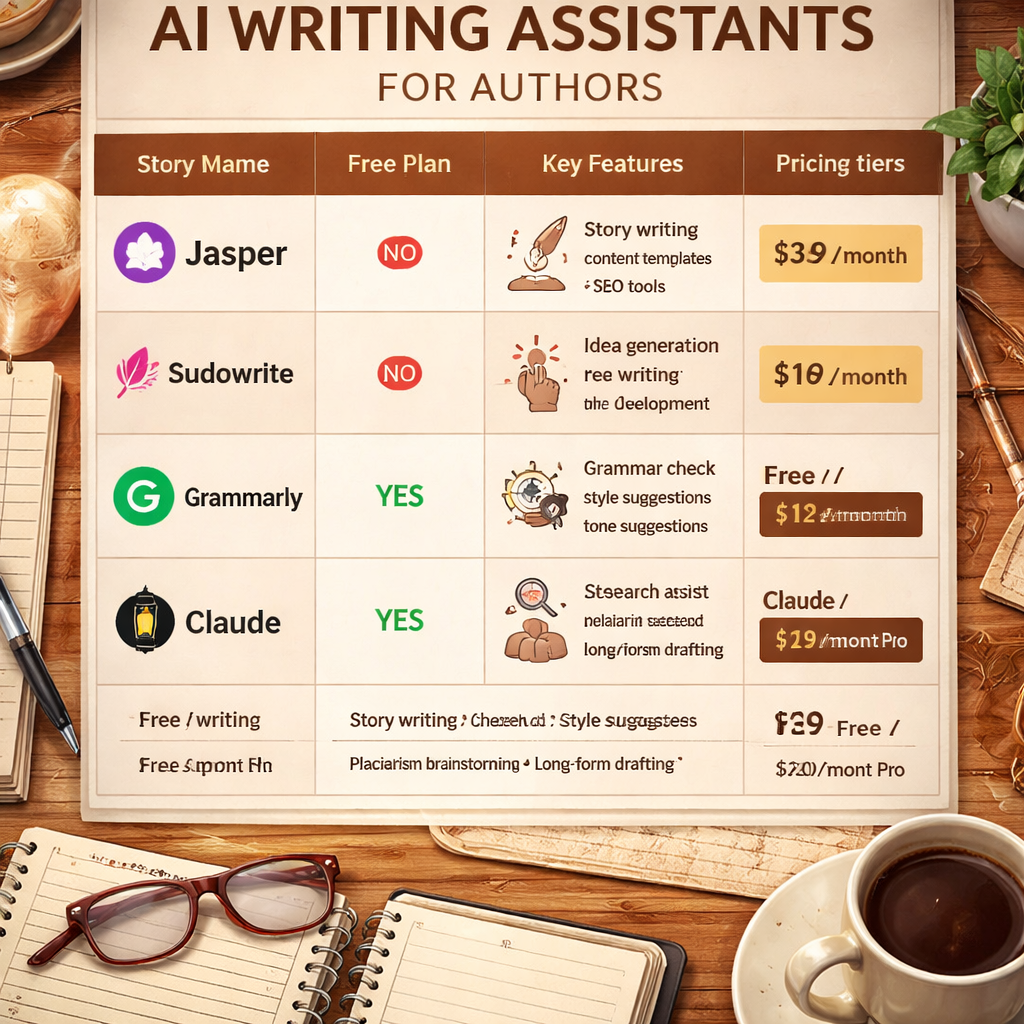
Pricing Comparison Table: Top Author AI Writing Assistants (2026 Edition)
Below is a fresh view of the tools, focusing on the pros, cons, and which author segment each serves best. This table is NOT a repeat of the research table; it adds practical angles for decision‑making.
How to read the table:
- Look at the “Best Use Case” column. If you write nonfiction and need marketing copy, Jasper shines.
- Check the “Pros” vs. “Cons” list. For a tight budget, Notion AI’s cheap price outweighs its lack of features.
- Match the “Key Feature” to your biggest pain point. Need character depth? Sudowrite wins.
Real‑world example: A mid‑list author wrote a 60‑chapter memoir. They used Notion AI for chapter outlines, Sudowrite for the few dialogue sections, and Jasper for the book description. Their total monthly spend was $8 + $10 + $49 = $67, well under the $87 they would have paid using an unlimited plan with Copy.ai.
That mix‑and‑match approach keeps author AI writing assistant pricing realistic and flexible.
From Pen to Profit: A Guide on How to Make Money Writing a Book shows how cutting tool costs can directly boost profit margins, especially for self‑published authors.
Conclusion & Next Steps
Author AI writing assistant pricing doesn’t have to be a mystery. By understanding the three main models, flat fee, credit‑based, and unlimited, you can line up the tool that matches your output and your budget.
Remember the three key findings: the most expensive tools aren’t always the best for authors, only Copy.ai gives you unlimited words, and Sudowrite offers the best value for fiction writers at $10 /mo.
Take these actions today:
- Calculate your monthly word count.
- Match that count to a pricing model using the spreadsheet method.
- Start a free trial of two tools that fit different phases of your workflow.
- Re‑evaluate after a month and cut any tool that isn’t delivering ROI.
When you get the pricing right, you free up cash and mental energy to focus on the craft you love. That’s the real win for any author.
FAQ
What should I look for first when comparing author AI writing assistant pricing?
Start with your writing volume and the features you truly need. If you write under 10,000 words a month, a flat‑fee tool like Notion AI may be enough. For fiction writers, prioritize character‑development features, which Sudowrite offers at $10 /mo. Always add a 20 % buffer to avoid surprise costs.
Is an unlimited word limit worth the extra cost?
Only if you consistently exceed the caps of cheaper tools. Copy.ai’s unlimited plan at $24 /mo (annual) removes the worry of hitting limits, but it lacks author‑specific tools. For most writers, a credit‑based system with a modest word cap is more cost‑effective.
Can I switch plans later without losing my work?
Yes. Most tools store your drafts in the cloud. Notion AI, Sudowrite, and Jasper all let you export your content before downgrading. Just back up your files to avoid any accidental loss.
How does author AI writing assistant pricing affect my overall book budget?
Tool costs are a line item in your publishing budget. If you spend $70 a month on AI, that’s $840 a year, roughly 5 % of a $15,000 self‑publishing budget. Cutting unnecessary tools can boost your profit margin significantly.
Do any tools offer discounts for annual billing?
Yes. Copy.ai drops to $24 /mo when you pay yearly, and Sudowrite offers a small discount on its Professional plan for annual commitments. Always check the pricing page for the latest promos before you sign up.
What if I need both fiction and nonfiction tools?
You can layer a cheap flat‑fee tool for nonfiction (Notion AI) with a credit‑based fiction tool (Sudowrite). This hybrid approach keeps author AI writing assistant pricing low while giving you the best features for each genre.